

On October 14, 2026 I did a full day of SEO work on seolab.org without opening wp-admin. Claude Code issued every change through the WordPress REST API: 10 retitled posts, 10 new meta descriptions, 23 URLs removed, 23 status rules written and one author account merged. Five times, what the API told me did not match what the live site served.
This post is the setup, the calls, and those five mismatches, because each one returned a success and was still wrong.
How do you give Claude Code access to WordPress?
With an application password. WordPress has shipped them since version 5.6, and the REST API authentication guide says they are generated from the Edit User page. The password goes in a local .env file that is never committed, and every call loads it from there:
set -a && . ./.env && set +a
curl -s -u "$WP_USER:$WP_APP_PASSWORD" \
  -H 'content-type: application/json' -X POST \
  "$WP_URL/wp-json/wp/v2/posts/2085" \
  -d '{"title":"Fix Trailing Slash Canonical Mismatches in Next.js on Vercel",
       "meta":{"_yoast_wpseo_title":"Trailing Slash Canonical Fix | Next.js on Vercel | SEO Lab"}}'
That one call changes the post title and the Yoast title tag. The slug stays the same, so no URL changes and nothing needs a redirect.
What did one day of terminal SEO cover?
| Job | Endpoint | Count |
|---|---|---|
| Post titles and Yoast title tags | wp/v2/posts/{id} | 10 |
| Meta descriptions | wp/v2/posts/{id} | 10 |
| Related-post paragraphs inserted before Sources | wp/v2/posts/{id} | 9 |
| Old posts and pages moved to trash | wp/v2/posts, wp/v2/pages | 15 + 8 |
| Menu items pointing at removed pages | wp/v2/menu-items | 3 |
| 410 rules for the removed URLs | redirection/v1/redirect | 23 |
| Author merge, with content reassigned | wp/v2/users/{id}?reassign= | 1 account, 72 items |
| New pages: author bio and content policy | wp/v2/pages | 2 |
The merged account owned 40 published posts, 17 drafts, 9 trashed posts and 6 pages. All of it moved to one byline in a single DELETE call with a reassign parameter.
Why did the page’s SEO title save on posts but not on pages?
Because a meta field only exists in the REST API if it was registered for that object type. WordPress’s guide to modifying responses says a key is accessible “when registering a new meta key” with show_in_rest set to true.
On this install, _yoast_wpseo_title and _yoast_wpseo_metadesc are writable on posts. On pages they are not. I sent the same meta object to both new pages and got a 200 back each time. The page’s meta in the response held one key, footnotes. The live title tag was the default “Rob Boirun – SEO Lab”, and there was no meta description at all.
An unregistered meta key is dropped without an error. So read the field back from the response, not the status code. I finished those two pages in the block editor, setting Yoast’s fields through its editor store and saving.
Why did 2 of 23 removed URLs redirect instead of returning 410?
WordPress remembers old slugs. Its wp_old_slug_redirect() function exists to “redirect old slugs to the correct permalink.” Two coupon posts from 2018 had once been duplicates of two others, so their history held the other posts’ slugs.
When I trashed all four, requests for the two original URLs got a 301 from WordPress to ?p=846 and ?p=1955, the trashed copies. Those return 404. The response header said x-redirect-by: WordPress, and WordPress answered before the Redirection plugin’s 410 rule could.
The fix is to delete those two posts from the trash. WordPress also does that by itself: the wp-config documentation gives EMPTY_TRASH_DAYS a default of 30 days.
Why did working 410 rules still return 404?
Two separate reasons, and I hit both on the same URLs.
- The page cache. One URL kept answering 404 after its rule existed. The header showed
x-litespeed-cache: hit: LiteSpeed was serving the 404 it had cached before the rule. Purging the LiteSpeed cache fixed it. - Query strings. Redirection created each rule with exact query matching. With a cache-busting parameter added, 20 URLs that returned 410 without it returned 404. A link carrying
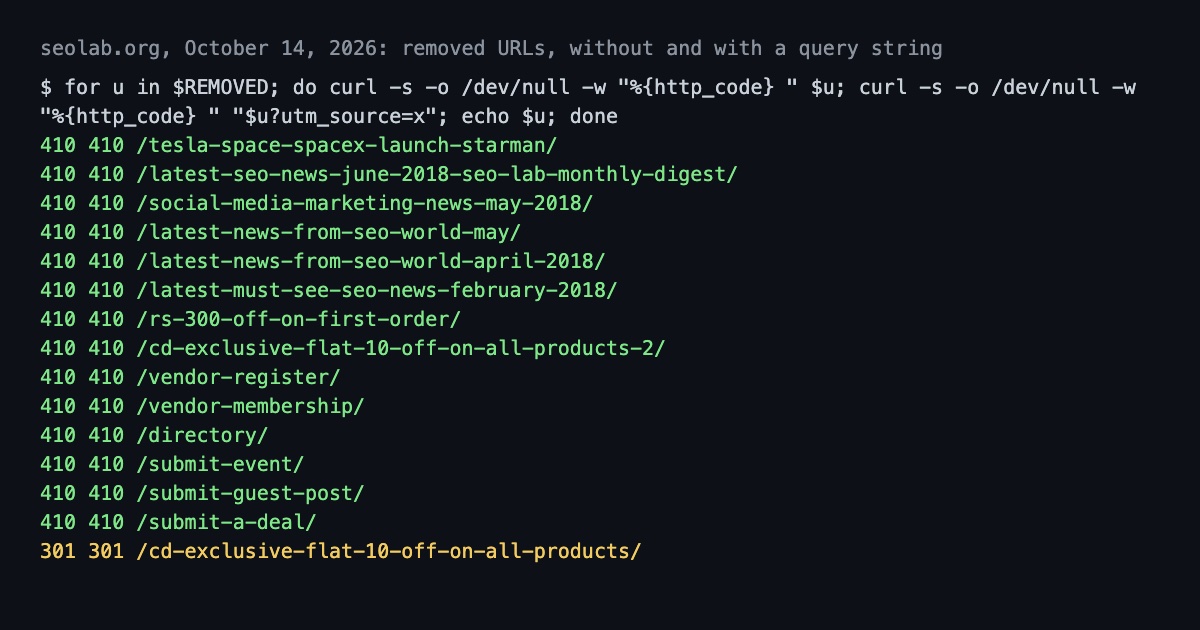
?utm_source=would have missed the rule the same way. Setting each rule’s query matching to “ignore” made all 21 that can return 410 do so either way.
The Redirection REST API handled both the create and the update, and it says plainly that “all requests must be authenticated.” The application password works for it.
Can you trust the API’s own count?
Not on its own. Straight after creating 23 rules, Redirection’s list call reported a total of 4, the rules that were there before. I took that as a failure and sent a test create. Its response listed rules up to id 28, which proved the 23 had saved and left me a duplicate to delete.
The check that settles it is the live URL. I ran curl on all 23 removed URLs, with and without a query string, after every change. That is how mismatches two, three and four showed up at all.
What happens when the connection drops halfway through a batch?
The title batch died after 5 of 10 posts with “other side closed,” and later calls failed the same way at random. Every write in this post sets a value rather than adding one: the same title, the same rule, the same meta description. So re-running the batch was safe, and the retry loop only had to try again.
The one exception was a create call. Creating a rule twice makes two rules, which is how I ended up with the duplicate. Retry updates freely; check before you retry a create.
Isn’t a 410 better for SEO than a 404?
Not for Google. I set the 410 rules because I believed Google drops a 410 faster. Its HTTP status code documentation says otherwise: “All 4xx errors, except 429, are treated the same.” Indexed URLs that return a 4xx “are removed from the index.”
So for Google, moving the 23 URLs to the trash already did the job: they returned 404 the moment they were trashed. The 410 rules, the cache purge and the query-string fix changed nothing Google acts on. What did matter was the cleanup around the removal: removing the main-menu link to a removed page, and checking that the sitemaps no longer listed any of the 23.
How should you run WordPress SEO changes from the terminal?
- Create an application password for an administrator account and keep it in an uncommitted
.env. - Before a batch, write one post and read the field back from the response. If a meta key is missing from the response, it is not registered for that type, and the write did nothing.
- Make every write set a value, so a dropped connection is fixed by re-running. Check for an existing object before you retry a create.
- After removing content, fetch each old URL, with and without a query string. Look for
x-redirect-by: WordPressand for cache hits. - Purge the page cache after rules change, then check again.
- Check the menus and sitemaps for links to what you removed. For Google, that matters more than 404 versus 410.
The same lesson, check the live site and not the tool’s report, runs through fixing trailing slash canonical mismatches in Next.js on Vercel, where a deploy quietly undid a live fix. How we make our content covers what Claude does on this site and what I check.
Sources
- WordPress Developer Resources, REST API Authentication, application passwords.
- WordPress Developer Resources, Modifying Responses,
show_in_restfor meta. - WordPress Developer Resources, wp_old_slug_redirect().
- WordPress Developer Resources, Editing wp-config.php,
EMPTY_TRASH_DAYS. - Redirection, REST API reference.
- Google Search Central, How HTTP Status Codes Affect Google’s Crawlers (page updated 2026-02-04).
- The seolab.org REST responses and
curlchecks, October 14, 2026.

